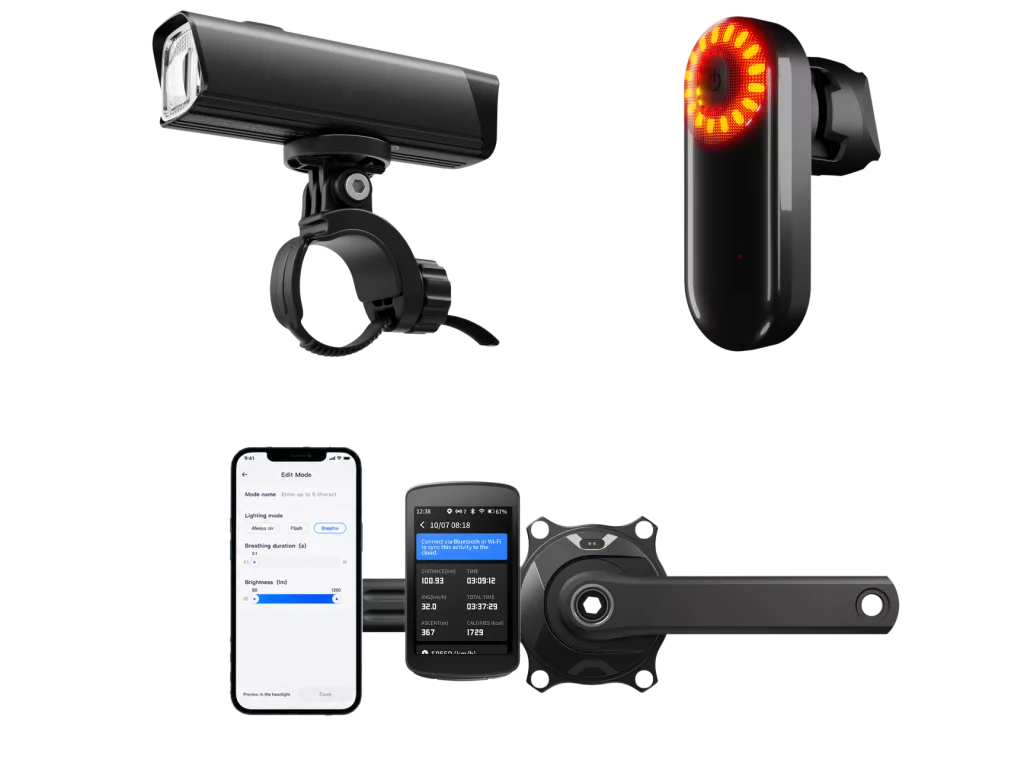
Your power, heart rate and speed can come from three different devices. Yet you can see them on one screen. Add a compatible radar tail light, and that screen can also show approaching vehicles.
Connected cycling devices work together through a bike computer. Sensors send measurements over ANT+ or Bluetooth. The computer displays and records supported data. It can also control compatible smart bike lights. After the ride, an app helps move the activity to your chosen training platform.
The key is knowing what each connection actually does.
The Computer Is the Hub
What is a bike computer? In a connected setup, it is your main display and ride recorder. It receives sensor data and combines it with its own information, such as satellite-based position.
You choose which readings appear together. Power, heart rate and cadence can share a training page. A different page can show navigation or supported accessory controls.
The Magene C606 bike computer provides one example. It supports compatible power meters, cycling sensors and radar tail lights. Its riding assistant adds control options for specified lights.
This does not mean every accessory communicates directly with every other accessory. A heart rate monitor does not need to send data through a power meter. Each device connects to the computer for its own purpose.
To understand the system, start with those individual roles.
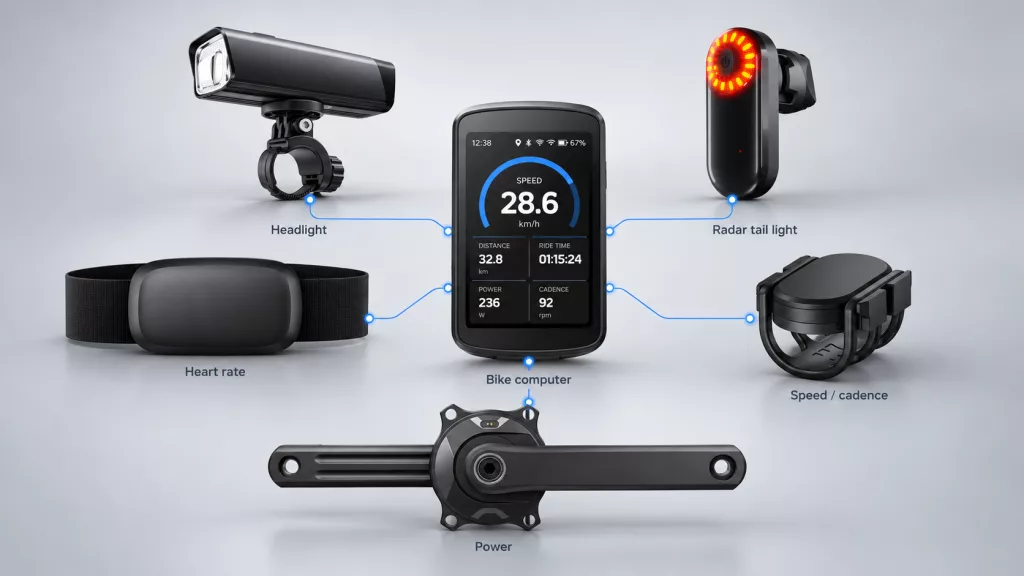
Give Each Device a Role
A useful cycling ecosystem brings together different information, not more hardware for its own sake.
| Device | What it provides | How it helps |
|---|---|---|
| Power meter | Power output in watts; sometimes cadence | Shows the effort you put into the pedals |
| Heart rate monitor | Heart rate | Shows how your body responds to that effort |
| Speed or cadence sensor | Wheel speed or pedalling rate | Adds a dedicated source for either reading |
| Compatible smart bike light | Supported battery and mode information | Helps you check and manage lighting |
| Radar tail light | Supported rear-vehicle detection data | Adds approaching-vehicle alerts to a compatible display |
For brands, power meter development and smart sensor development address different measurement needs. Their value becomes clearer when riders can view the readings together.
You may not need a separate cadence sensor if your power meter already supplies cadence. A GPS bike computer can also estimate speed from satellite signals. Choose extra sensors when they serve a clear need.
Those readings reach the screen through compatible wireless connections.
Connect Through ANT+ or Bluetooth
ANT+ and Bluetooth Low Energy carry data between cycling devices. However, a shared wireless logo is only the first compatibility check.
Both devices must understand the relevant data format. The receiver must also support the fields you want. The Bluetooth SIG’s Cycling Power Service, for example, defines power data and optional speed or cadence data.
ANT+ can let several receivers listen to one sensor. Bluetooth connection capacity varies by product. Do not assume every Bluetooth sensor supports only one connection, or unlimited connections.
A dual-protocol sensor may appear twice during scanning. Check its device ID and select the intended connection. Our ANT+ vs Bluetooth guide explains the practical differences.
Receiving measurements is one task. Sending control commands is another.
Bring Lights and Alerts Together
Smart bike lights add more than another data field. With supported products, the computer can receive status information and send lighting commands.
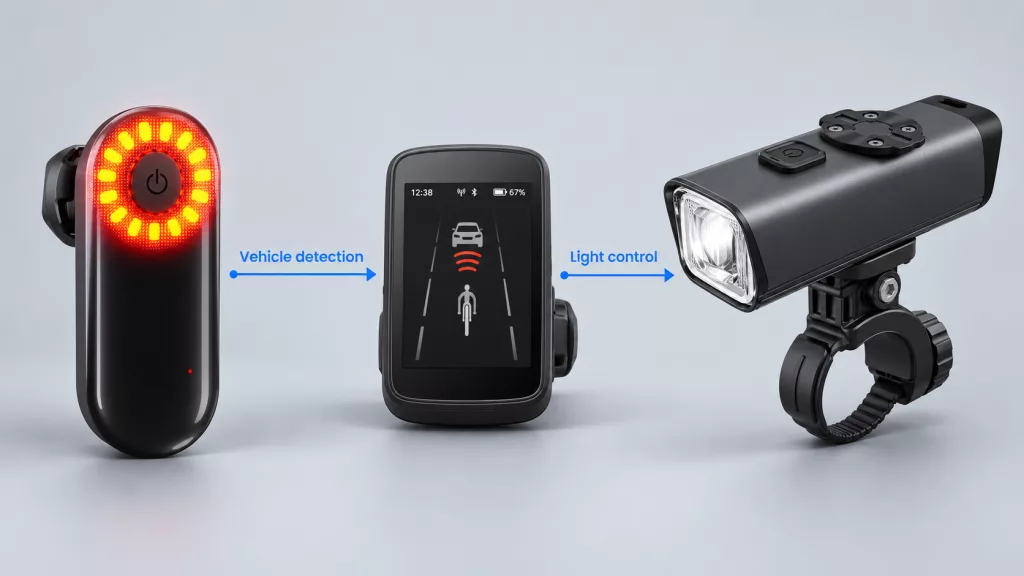
A radar tail light sends detection information to the computer. The computer presents supported alerts. Separately, it may let you change the light’s mode. Radar support and light control are different functions; check both.
Magene’s C606 Riding Assistant guide shows how this works. OnelapFit lets you configure controls for AT1200/AT1600 headlights and L308/L508 tail lights. Supported display options include headlight battery information and radar vehicle distance.
The guide also describes speed-based light-mode rules. Here, the computer uses a speed condition to trigger a lighting command. Available functions depend on the models, firmware and settings.
Other actions can happen inside the light itself, such as local brake sensing. They do not always pass through the computer. Explore our bike light solutions for the different product roles.
Radar is an aid to awareness. No alert does not mean the road is clear.
Set Up Before You Ride
Once you know the supported functions, pairing becomes easier. To connect a power meter to a bike computer, wake the meter and open the computer’s sensor menu. Search for the device, confirm its ID and pair it.
Use the same approach for your other sensors. Then finish the setup:
- Select your preferred speed and cadence sources, where the computer allows this.
- Add the data fields you need to your riding pages.
- Configure supported light controls and radar alerts.
- Check live readings and battery levels before setting off.
- Save a short test ride and review the recorded data.
If a reading is missing, check power, sensor mode and firmware. Another app may already occupy a limited Bluetooth connection. Follow the product’s pairing instructions before replacing hardware.
With those checks complete, the separate connections become one riding experience.
Follow a Connected Ride
Imagine starting a road ride with a power meter, heart rate monitor and radar tail light. Your computer confirms the connections before you leave.
On a climb, power shows your current output. Heart rate adds context about your body’s response. Cadence shows how quickly you turn the pedals. Seeing all three together helps you judge your pace without switching displays.
When the radar detects an approaching vehicle, the computer shows a supported alert. Continue checking the road and surroundings. If light controls are available, adjust the mode when it is safe to do so.
These devices remain independent. Connecting a power meter does not improve its measurement accuracy. The benefit is easier access to useful information in one place.
The computer also records supported ride metrics, ready for review when you finish.

Sync After the Ride
Save the activity before starting cycling data sync. For supported Magene computers, OnelapFit handles settings, data synchronisation and analysis. It also supports uploads to platforms such as Strava and TrainingPeaks after account authorisation.
Local sensor reception is different from online sharing. You do not need mobile internet simply to receive compatible sensor data. Uploads and other connected services have their own network requirements.
Not everything shown on the screen necessarily appears in the activity file. Check whether radar alerts or light states are recorded and exported. A successful upload alone cannot prove every field survived.
For product teams, that distinction belongs in system testing.
Test the Whole System
When developing connected cycling products, define the target experience before choosing a protocol. Name the bike computers, apps and functions the product must support.
Test the complete combination, not only each accessory in isolation. Include:
- Required data fields and supported light commands.
- All intended devices connected at the same time.
- Reconnection after signal loss, sleep or a restart.
- Low-battery behaviour and firmware changes.
- Data recording, export and platform upload.
For US and European launches, validate the intended regional setup. Include language, measurement units and the target software versions. Do not treat one successful setup as evidence for every model or market.
Magene computers can provide a practical reference for testing. Include other computers your customers expect to use, too. Any ODM adaptations should follow a defined scope and feasibility review.
Build a Connected Ride
A useful connected setup gives each device a clear job. Power meters and sensors measure. Lights illuminate or provide supported alerts. The bike computer brings information and controls together, then passes the ride record to an app.
Planning a power meter, sensor or bike light project? Discuss your ODM requirements with Magene Enterprise. Share your target computers, required data and control functions to start the compatibility discussion.